Barcode Printers — Lessons from Natural Stone Slabs
Sticking a barcode label onto a natural stone slab sounds trivial. It is not. The surface is porous, dusty, often wet. Standard labels last days, not months. And even when the adhesive works — the tablet in the warehouse cannot find the industrial printer. This article sums up what works in practice: which print technology, which adhesive, which software bridge between mobile device and label printer.
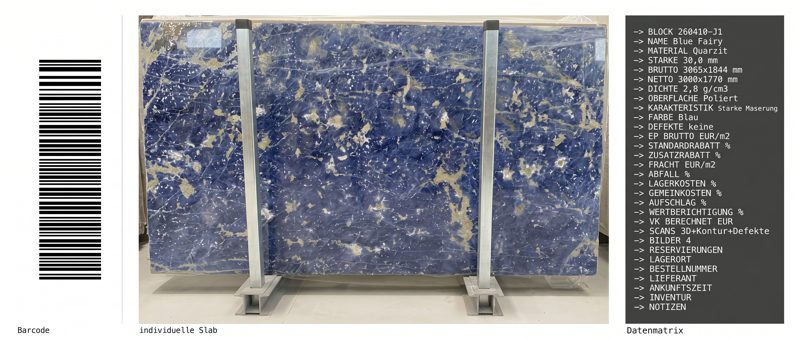
When 10 Cents Decide Success
A stone fabricator buys a block of Nero Marquina. The block is gang-sawed into 38 slabs, each slab gets its own barcode label. After three months in the outdoor yard, the labels on the rear slabs have faded — UV radiation, rain, stone dust. The slab numbers are no longer readable.
From that moment on, inventory and sales system are out of sync. In the worst case, the slab cannot be found during the sale or is booked as missing during the next stocktake. A 10-cent label, chosen wrongly, makes a slab worth several hundred euros invisible.
This happens in shops that use barcode labels from the office supply store. Paper labels with standard adhesive. Printed on a direct thermal printer designed for shipping labels. On a desk, that works. On a raw natural stone slab, it does not.
Why Standard Labels Fail on Stone
Natural stone as a label substrate is a challenge that label manufacturer HERMA explicitly names: stone slabs belong to the category of "difficult surfaces" — porous, dusty, textured (source: HERMA, Difficult Surfaces category). Standard adhesives only partially bond because the contact area is reduced by unevenness and dust.
Three factors decide whether a label holds on a natural stone slab:
1. Print technology: direct thermal vs. thermal transfer. Direct thermal printers work without a ribbon — the heat of the print head darkens chemically treated special paper. That is cheap and fast. But UV radiation, heat and moisture make the print fade within 6 to 12 months (source: Zebra Technologies, Brother Mobile Solutions). For shipping labels that stick to a parcel for three days, that is enough. For a slab standing in an outdoor yard, it is not.
Thermal transfer printers work with a ribbon that transfers ink onto the label material. The ribbon type is decisive: wax ribbons (standard, 75 percent of all applications) are intended for indoor use. Resin ribbons withstand UV radiation, chemicals and temperatures up to 120 degrees Celsius — this is the right choice for natural stone.
2. Label material: polyester instead of paper. Paper labels tear, absorb moisture and peel off. Polyester labels (PET) are waterproof, scratch-resistant and UV-resistant. Industrial label manufacturer Grizzly Tags confirms: for porous, dusty surfaces such as precast concrete parts and stone slabs, thicker labels with aggressive initial tack are required (source: Grizzly Tags, A35 Industrial Poly Label).
3. Adhesive: high-tack is mandatory. Standard acrylic adhesive sticks to smooth surfaces. Natural stone has pores, grooves and dust layers. High-tack adhesive with high initial adhesion and permanent final adhesion is the only option. Brother offers an Extra Strength variant of its laminated TZe tapes for textured surfaces — an alternative for small shops with low label volume (source: Brother, TZe Extra Strength Adhesive).
The combination of resin ribbon, polyester label and high-tack adhesive is the standard that works in practice. Cost per label: 0.03 to 0.06 euros.
AirPrint Meets the Stone Industry
The material is settled. Resin ribbon, polyester, high-tack. The matching printer is in the catalog: a Zebra ZD421 or ZD621 for 400 to 1,200 euros (source: Zebra Technologies, Computype). Thermal transfer, 203 dpi, Ethernet and USB.
Then comes the IT question that no product catalog mentions: how does a warehouse worker print a label from a tablet?
The short answer: not at all — at least not with normal built-in tools.
Industrial label printers speak ZPL (Zebra Programming Language) or TSPL. They do not support AirPrint, Mopria or any standard print dialog. An iPad or Android tablet simply cannot find the printer. The print services a smartphone uses for the office printer on Wi-Fi do not exist for label printers.
Those who nevertheless try it via the browser run into the next problem: the browser adds page margins, URLs and page numbers. A barcode that must be rendered at exactly 203 dpi is scaled and thus becomes unreadable. The scanner beeps — but the device recognises nothing.
Zebra offers its own SDK for Android. For iOS there is nothing comparable. Brother has plugins for its shipping printers — not for laminated-tape printers. Every manufacturer works with its own system. A standardised solution that works across platforms does not exist on the market.
The Print Bridge Solution
The solution is a middleware that sits between the mobile device and the printer. In technical jargon: a print bridge. A local server — a small computer in the network, often no more than a mini PC — creates a virtual printer that tablets and handheld scanners discover on the Wi-Fi. Print jobs are sent to this virtual printer and forwarded by the bridge to the industrial label printer.
PaperCut Mobility Print is a free option that creates virtual AirPrint printers on a server (source: PaperCut). For generic printers, that works. For ZPL label printers, barcode quality remains a question mark because converting through the standard print path loses DPI control.
Case study: label printing at a Swiss stone fabricator
The team around Jan Keller set up label printing at a stone fabricator in Switzerland. The requirement was clear — print labels from the handheld scanner in the warehouse, without a detour via the office PC.
The bridge runs as a Python service on a Windows mini PC in the warehouse network. It announces itself via mDNS (Bonjour) as an IPP printer — new tablets or Zebra handheld scanners discover it automatically in the printer list, without manual configuration. Unlike generic AirPrint bridges, ZPL print data is passed 1:1 to the Windows driver of the label printer. DPI control is preserved, the barcode scans on the first attempt.
The workflow in the shop: a worker scans the QR code of an incoming delivery with the handheld scanner. The inventory software opens the record. The worker taps print — and the Zebra printer on the wall spits out the polyester label. No detour via the office computer, no USB stick, no manual retyping.
Cost of the bridge hardware: under 300 euros. Setup: half a day. The printer has been in continuous operation for 14 months without a failure. Printer driver updates and maintenance run in a single place, the end devices remain unconfigured.
What It Costs — and What It Saves
The investment for professional barcode labelling in a stone shop breaks down into three blocks:
Hardware: A Zebra ZD421 (desktop, thermal transfer) costs 400 to 500 euros. Those who need higher volume or a peeler reach for the ZD621 at 500 to 1,200 euros. An industrial model (ZT411) for high volume and 24/7 operation ranges from 1,000 to 1,400 euros (source: Zebra Technologies, Computype). Plus a barcode scanner for 200 to 500 euros. And a mini PC as a print bridge server for 200 to 300 euros.
Consumables: A roll of resin ribbon (300 metres) costs 15 to 30 euros. 1,000 polyester labels cost 20 to 50 euros. Per slab this works out to 0.03 to 0.06 euros for the label.
Alternative for small shops: A Brother P-touch with laminated TZe tapes (Extra Strength) costs 50 to 150 euros. The labels are more expensive at 0.10 to 0.20 euros each, durability is good (UV test per ISO 4892-2: 12 months simulated outdoor exposure, source: Brother). But: no network printing, no ZPL, limited volume. For 5 to 20 labels a day, a pragmatic solution.
The total cost per slab — printer amortised over three years plus consumables — comes to 0.15 to 0.40 euros per slab. The value of a single natural stone slab is between 500 and 5,000 euros. A lost slab costs more than labelling the entire warehouse.
From Label to Digital Slab Passport
Label hardware, print bridge, scanner integration — that is rarely standard. Which is why DDL does not place such building blocks as a feature checkbox, but implements them in direct partnership with the shop: pragmatic, on available hardware, at a cost a small stone fabricator can afford. The Swiss installation described in this article was built exactly this way. This approach is meant to secure, in every company, end-to-end slab tracking, virtual slab layout before cutting, the direct DXF path to the CNC, and the handling of remnants as independent objects. DDL captures every natural stone slab, the barcode links the physical stone to its digital profile. By scan the full information is available and can be extended right away.
Explore inventory managementRFID? A Brief Reality Check
RFID tags read without line of sight, capture several slabs at once and store writable data. IDStone from Spain offers patented RFID labels for natural stone slabs that even survive the polishing process and drying ovens (source: IDStone.es). For large producers with thousands of slabs and automated production lines, this is interesting.
For a stone fabricator with 10 to 20 employees and 400 to 1,000 slabs in stock? RFID tags cost 0.10 to 2.00 euros each — a multiple of a barcode label. The infrastructure (readers, antennas) ranges from 2,000 to 10,000 euros (source: Lowry Solutions, ID Images). And the benefit — reading entire packages at once — only arises with block handling in high-volume production.
Barcode remains the right choice for most stone fabricators. Scanners for 200 to 500 euros, labels for 3 to 6 cents, no special infrastructure. The smartphone camera reads QR codes without additional hardware.
More on inventory management: Excel vs. digital slab inventory — why stone fabricators switch.
Jan Keller answers questions about labelling and label printing in your own shop.
Explore DDL Solutions
Setting up label printing in a stone shop?
Jan Keller shows which printer, which material and which software bridge fit your own shop. A conversation, 20 minutes.