Stone Slab Inventory Tracking: The Costs Spreadsheets Hide
A CNC bridge saw is one of the largest investments a fabrication shop makes. Its cost is visible: budgeted, on the balance sheet, depreciated over years. The cost of poor inventory tracking shows up nowhere. It hides in double-sold slabs, in remnants nobody can find, in the search routine in the yard. Inventory tracking only stops these losses if it records every slab as a unique object. Most stone fabricators know the problem. Very few have ever put a number on it.
The Spreadsheet Tax
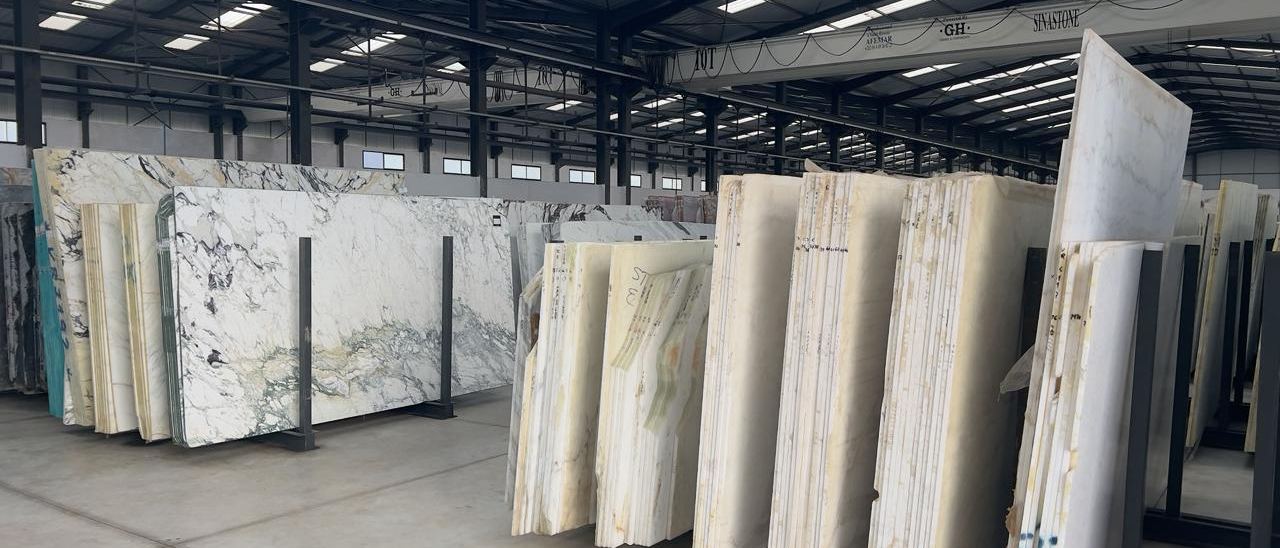
Spreadsheets — everyone has them and many love them. Spreadsheets work for things that are interchangeable. Screws. Tiles. Bags of cement. Items with a SKU and a reorder point. Here is the twist: most natural stone slabs are none of those things.
Every slab is unique. A Verde Gaya slab from Block 4711 has a different veining, different dimensions, and a different weight than the slabs from Block 4712. That makes a reorder with identical configuration impossible. When a customer selects a specific slab for their project, they expect exactly that slab. Not the roughly similar replacement from another block.
Back to the spreadsheet: it cannot represent this reality. It reduces a unique physical object to a row — material name, thickness, purchase date, block number, barcode, maybe a location code. But the most decisive characteristic of the slab is missing: the true character of the slab — the veining. In parallel, organizational data is also absent: which quotes the slab is included in, the reservation status (which usually lives in someone's head or on a sticky note on the A-frame), the link to matching slabs from previous deliveries.
Every manual entry can go wrong: wrong location, wrong dimensions, wrong availability status. Each error triggers the same chain. A worker walks to Row 12 and the slab is not there. Ten minutes of searching. If that happens five times a day, it adds up to more than four working hours a week spent looking for stone the company already owns.
The spreadsheet as a working tool can be corrected. The costs that already accumulated from the consequences of those errors remain.
Five Problems Hiding in Your Slab Yard
Ghost Inventory
Slabs that exist in the system but not in the yard. Sold three weeks ago, consumed in a project, moved to a different location — but the spreadsheet still shows them as available. The yard worker knows. The system does not. Every ghost slab can become a promise to a customer that cannot be kept. Along with the loss of trust that follows.
Double-Selling
Two employees reserve the same slab for two different projects because there is no real-time reservation mechanism. The second customer usually finds out when the truck is already in the yard for pickup. A rush order rarely fixes it: a slab from another block will not match the veining the customer approved. The project waits, and someone has to have the conversation nobody wants to have.
Remnant Blindness
Offcuts end up leaning against a wall without a label. A few months later nobody knows which block they came from, and some weather outdoors for years. Recorded with block, dimensions and photo, a remnant can still be sold or planned into a smaller job such as a vanity top or window sills. Unrecorded, it gets moved around, takes up rack space and in the end costs money to dispose of.
Data Stuck in Old Software
In many stone companies, an old scanner program or a local database runs next to Excel, the accounting package and the quoting tool. Where these systems do not talk to each other, the same slab gets typed in twice, and one of the two entries is wrong. José Daniel Bernardino, CEO of Sociror in Portugal, describes the starting point: “Our scanner software had no support and our stock was stuck on a local database — customers couldn't see what's available.”
The Stocktake That Stops the Yard
In many yards the stocktake is an annual event: two people with a clipboard walk the A-frames, flip through the slabs to read the block numbers, and afterwards someone types the list into a spreadsheet. The inventory valuation for the tax return is then compiled by hand from that list. By the time it is finished, the first slabs have already been sold, moved or cut.
The Math Everyone Knows but Rarely Questions
Hardly any stone company has put its own numbers on these problems, and published averages from other yards rarely fit. The calculation takes an afternoon: how many slab searches per day and how long each one takes, how many slabs were promised twice last year and what the replacement cost, what the remnants on the racks would still sell for.
The lever is always the same: knowing what is in the yard, where it is, and whether it is already spoken for.
From practice: Jan Keller was able to use digitized remnants to cover an entire lobby floor so that the veining across all slabs looked as if it came from a single block — a cool white with a characteristic diagonal vein that transitioned into a warm white. Estimated delivery volume: over $120,000. The planning was only possible because those remnants were not sitting on pallets somewhere on the grounds, but digitized, cataloged, and available for digital blending. (Watch the project)
What Inventory Tracking Has to Record for Every Slab
A spreadsheet row holds a material name. Slab-level tracking has to hold the slab itself: one record per piece, updated the moment something happens to it. Seven points decide whether that record helps in the yard, in sales and at the saw. How to compare software for this is covered in the guide to choosing a stone slab inventory system.
Block and origin. The block number links slabs that were sawn from the same block. When a customer approves three slabs from one block for a floor, a fourth slab from another block will not match the veining, even under the same material name. Thickness and surface finish belong in the same record.
Actual dimensions. Length and width as measured on the slab itself. The nominal format on a supplier list says little about a raw slab with an irregular contour, and a small difference decides whether the largest piece of a job still fits.
Photos. The veining is why a customer picks one slab over another. A photo of the whole slab, linked to its record, lets sales staff and architects choose without walking the yard. For layout planning, the image has to be true to scale.
Location. Warehouse, row, A-frame or rack slot. A location that is updated once a year is a guess. Scanning the location label and then the slab label keeps it current with every move.
Status and reservation. Available, reserved, sold, defective, missing. A reservation has to be visible to everyone who can put the slab into a quote or a project, at the same moment. A live inventory system shows it the second it is made.
Remnants. After cutting, the offcut needs a record of its own with block reference, dimensions, photo and a new label. Without the block reference, the remnant loses exactly the information that would let someone match it to a later job.
Updates at the A-frame. Status changes happen in the yard. If every move has to be typed into an office computer later, the record falls behind the stock. A phone or handheld scanner that keeps working in dead spots between the racks closes that gap.
Slab-Level Tracking — Every Slab as a Unique Object
In DDL, every slab is its own record with block, dimensions, photos and a warehouse location down to the compartment. Its status is visible to the whole team: available, reserved, sold, defective or missing. Reservations apply across quotes and project planning, so the same slab cannot be booked twice. After cutting, remnants go back into stock automatically and can be relabeled on the spot. The handheld scanner app runs on any smartphone or a Zebra scanner and keeps working offline. More on warehouse management in DDL.
See how slab-level inventory worksThree Tests Before Choosing a System
Reserve One Slab Twice
In a demo, put a slab into a quote, then try to plan the same slab into a second project from another login. The reservation has to show up immediately, with a warning or a block. If it only appears after a refresh or a nightly sync, double-selling stays possible.
Move a Slab at the A-Frame
Relocate a slab with a phone or handheld scanner in the yard, then look at the office screen. The new location should already be there, without anyone typing it in again. Ask what happens in a dead spot between the racks where the signal drops.
Pick a Slab by Its Veining
Ask a colleague to choose a slab the way an architect would: by photo, veining, color and finish, filtered by material and availability. If the answer still requires a walk through the yard, the photos are missing or not linked to the slab. An online gallery with real slab images turns the same data into a sales channel.
Your Inventory Is Your Second Business
Every slab in the yard is capital that has already been paid for. That stock works like a second business: it either earns money or quietly loses it. Which of the two depends less on the stone than on one question — does someone know exactly what is in the yard, what is spoken for, and what can still be sold?
The search hours, the slabs promised twice and the unlabeled remnants can be counted in any yard. Nobody needs a study to see the problem. What differs from yard to yard is how long it stays invisible.
Questions about slab-level inventory management are answered by Jan Keller.
Related: Natural Stone Waste: Are Your Offcuts Collecting Dust or Generating Revenue? · Stone Fabrication Software: How to Separate Tools from Toys
Explore DDL Solutions

Time to see your full inventory?
Jan Keller shows how DDL tracks every slab from goods receipt to cutting, including remnants, reservations and the online gallery for customers. One conversation, 20 minutes.